Why RPA bots break, and how AI RPA fixes them.
RPA has automated a great deal of routine work. It has also created familiar problems: robots stop when a screen changes, only their builder can fix them, and robots nobody keeps track of multiply. This page sets out the common problems, their causes, and how AI RPA solves them.
In short
- Most RPA runs against the screen as it was recorded, so a changed screen or an unexpected pop-up stops it. Worse than the stop is that only the builder can fix it.
- AI RPA has AI read the screen and operate it, repeat what it learned once without the AI, and relearn only when a screen changes. You keep RPA's speed, and robots stop less and are easier to fix.
- You do not have to switch every robot at once. Start with the robots that stop most and matter most, and compare the total cost of keeping robots running, including fixes, not license fees alone. You can try one robot in a two-week PoC.
Six common problems with RPA
The problems we hear about most from teams that run RPA, and what happens instead with Kitewell, an AI RPA.
It stops when a screen changes
Problem
Robots record screen coordinates and elements, so even a small change to a web system or an unexpected pop-up stops them.
With Kitewell, an AI RPA
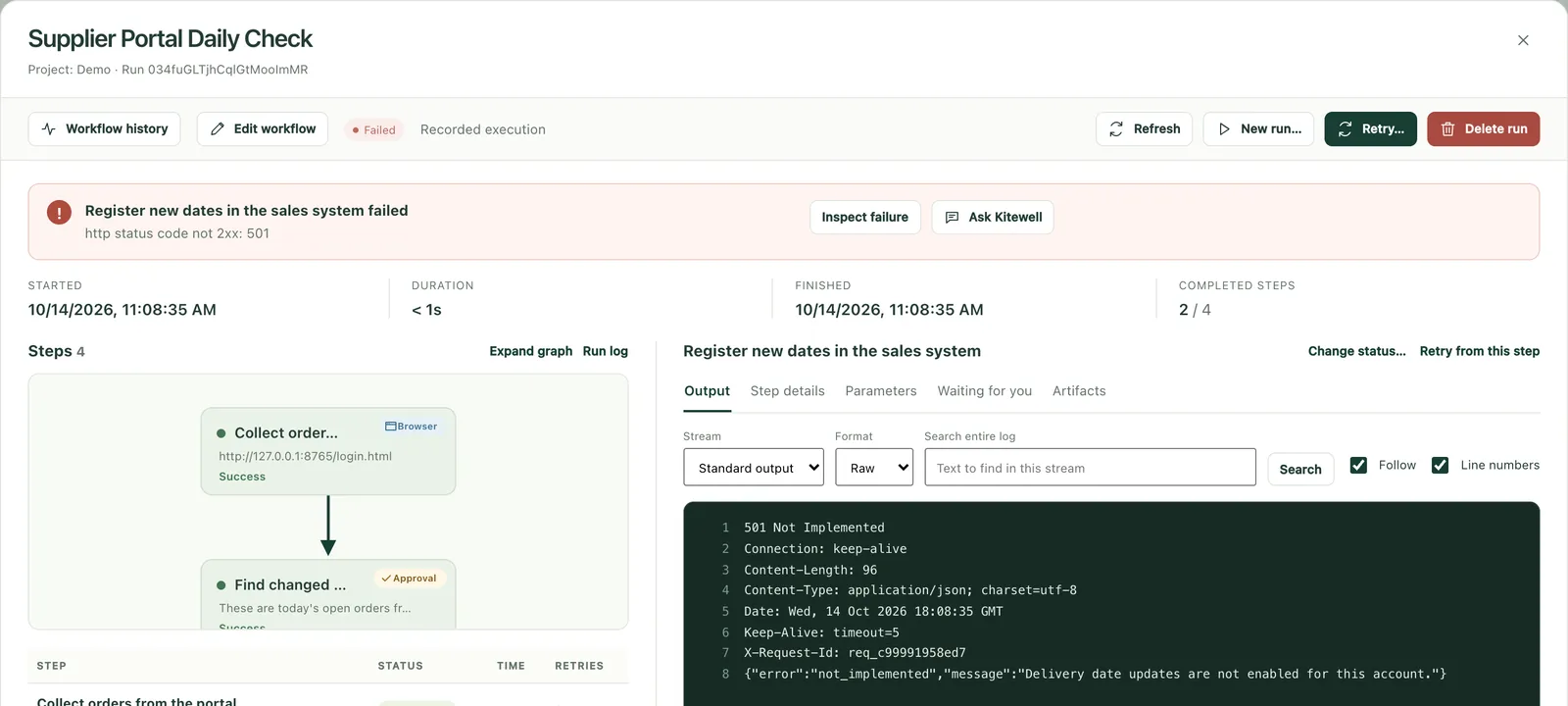
You write the steps in words, and AI reads the screen to operate it. What worked is remembered and repeated the same way; only when the screen changes does the AI relearn it. When a run stops, the reason is kept in a screenshot and the logs.
Only the builder can fix it
Problem
Only the person who built a scenario understands it. After a transfer or resignation, robots nobody can fix are left behind.
With Kitewell, an AI RPA
As you work, the assistant writes down in each workflow's knowledge what it is for, why it was built that way, and how it was fixed when it broke, and reads it before it answers. Whoever takes over starts where the builder left off. The steps themselves are in everyday language, and each change is reviewed as a diff before it is applied.
Robots nobody keeps track of
Problem
Robots built by each department multiply, and nobody knows what they do or when they stopped.
With Kitewell, an AI RPA
Every run, change, and approval is recorded, and failures and waiting approvals are sent to the people responsible. A robot ledger exports to Excel from each workflow's definition and knowledge.
Work that needs judgment stays manual
Problem
Reading invoices in many layouts, or deciding based on what a page says, is hard to automate with robots that only repeat fixed operations, so it stays manual.
With Kitewell, an AI RPA
AI reads values from documents and screens, and each value comes with the quote it was read from. Where a decision is needed, an approval step lets a person check before the run goes on.
Running costs you cannot see
Problem
On top of license fees come fixes after every screen change, calls to an outside maintenance vendor, and manual work while robots are down, so the total is hard to see.
With Kitewell, an AI RPA
When the remembered steps no longer work, AI relearns the operation, and you change steps by talking. Repeating a remembered operation costs nothing in AI fees, and pricing is per computer, never per user.
Price rises and end-of-support deadlines
Problem
WinActor raised its prices by roughly 10% in January 2025, and UiPath by about 10% in 2023. Microsoft plans to turn VBScript off by default around 2027, so scenarios that use VBScript will need rewriting.
With Kitewell, an AI RPA
Steps are written in the language of the work, not the screen's structure, so small screen changes need no rewrite. Dagu, the workflow engine underneath, is open source, so you are never locked in to one vendor.
Why RPA stops
Most RPA finds what to operate by screen coordinates, images, or element IDs and names, assuming the screen as it was recorded. A redesigned screen or a changed field, an unexpected pop-up, a slow page, or a change in the browser or screen resolution leaves it unable to find its target, and it stops.
The trouble continues after the stop. Only the builder understands the scenario, and fixing it takes knowledge of a dedicated development tool. When builders move on, or fixes depend on an outside vendor, even a small change costs time and money.
At the same time, companies are combining RPA with AI. In MM Research Institute's 2024 survey, 31% of companies using RPA combined it with generative AI, fully or in part. AI RPA makes that combination one system, from building a robot to fixing it.
Source: MM Research Institute's 2024 survey of RPA use in Japan (July 2024). The guides by product give pricing and support changes with sources.
Signs it is time to switch to AI RPA
- Some robots stop almost every month, and every fix depends on the builder or a maintenance vendor
- Builders have moved on or left, and robots nobody understands keep running
- Nobody can list how many robots there are and what each one does
- A license renewal, a price revision, or the end of VBScript or browser support is coming
- Work such as reading invoices was never automated because it needs judgment
- Audits or internal controls now require you to explain how robots are managed
RPA, AI agents, and AI RPA
There are three broad ways to operate screens automatically. They differ in when they use AI.
| Aspect | RPA | AI agents | Kitewell (AI RPA) |
|---|---|---|---|
| How it works | Replays recorded operations exactly | AI reads the screen and reasons through every run | Repeats operations the AI learned once, and uses AI again only when the screen changes |
| When a screen changes | Often cannot find its target and stops | Looks again on the spot, so it rarely stops | When the remembered steps do not work, AI reads the screen again and relearns the operation |
| Speed | Fast | Slow, waiting on the AI for every operation | Remembered operations repeat without waiting for the AI; learning and relearning take longer |
| AI fees | None | On every run | None to repeat a remembered operation |
| Repeatability | The same every time | Not always the same | Remembered operations repeat the same steps every time |
| Who fixes it | The scenario's builder or developers | The AI copes on the spot, but you need a separate way to catch its mistakes | The business owners, by talking with the assistant; relearned operations are in the run record |
Gartner says that for processes run at high frequency, AI agents can cost up to 30 times as much as RPA bots (ITmedia @IT, January 16, 2026).
Traditional RPA and AI RPA
Both repeat an operation that worked the same way every time. They differ when a screen changes, when the owner changes, and when a decision is needed.
| Aspect | Traditional RPA | Kitewell (AI RPA) |
|---|---|---|
| Screen operation | Records and replays coordinates and screen elements | Steps written in words; AI reads the screen to operate it. What worked is remembered and repeated the same way |
| When a screen changes | Scenarios often need to be fixed | Only when the remembered steps fail does the AI read the screen again and relearn them; the run record shows what it fixed |
| Building and fixing | Built by a specialist in a dedicated editor | Built and fixed by talking to the assistant, reviewed as a diff, then applied |
| When a run stops midway | Start over, or finish by hand | Continue from the step that stopped |
| When a decision is needed | People handle it outside the robot | A person decides in an approval step, and it is recorded |
| Keeping track | Management tends to be split robot by robot | Run history, change history, and alerts in one place, and a robot ledger exported to Excel |
| When the owner changes | Procedure documents are written apart from the scenario, by hand, and often fall behind | The assistant writes knowledge as you work and reads it before it answers; it fills the ledger too |
| Sharing a fix | Distributed from a management server, or scenario files copied to each machine | Fixed workflows and knowledge reach every device on the team on their own |
| Excel work | Operate Excel on screen, with scenario logic for the last row and type conversions | Workbooks read and written as files, with each row's work described in words; results written back to your workbook, and can be undone |
| Desktop applications | Can operate Windows desktop applications and Excel | Operates desktop applications on macOS and Windows, as well as web browsers, with AI reading the screen; remembered operations repeat while the screen looks the same |
| Email handling | Mail client macros or a separate integration product | Finding, organizing, and sending email in a connected mailbox are steps, with approvals where needed |
| What starts a run | A schedule or a person; outside events often need a separate server or product | A schedule, or a webhook from kintone, a form, or another service, relayed with no port to open |
| Cost per operation | Included in the license | No AI fees to repeat a remembered operation; fees only to learn one, relearn it after a screen change, or read the screen |
| Speed | Replays fixed operations quickly | Remembered operations repeat without waiting for the AI; learning or relearning one takes longer |
Capabilities vary by RPA product. This compares general tendencies.
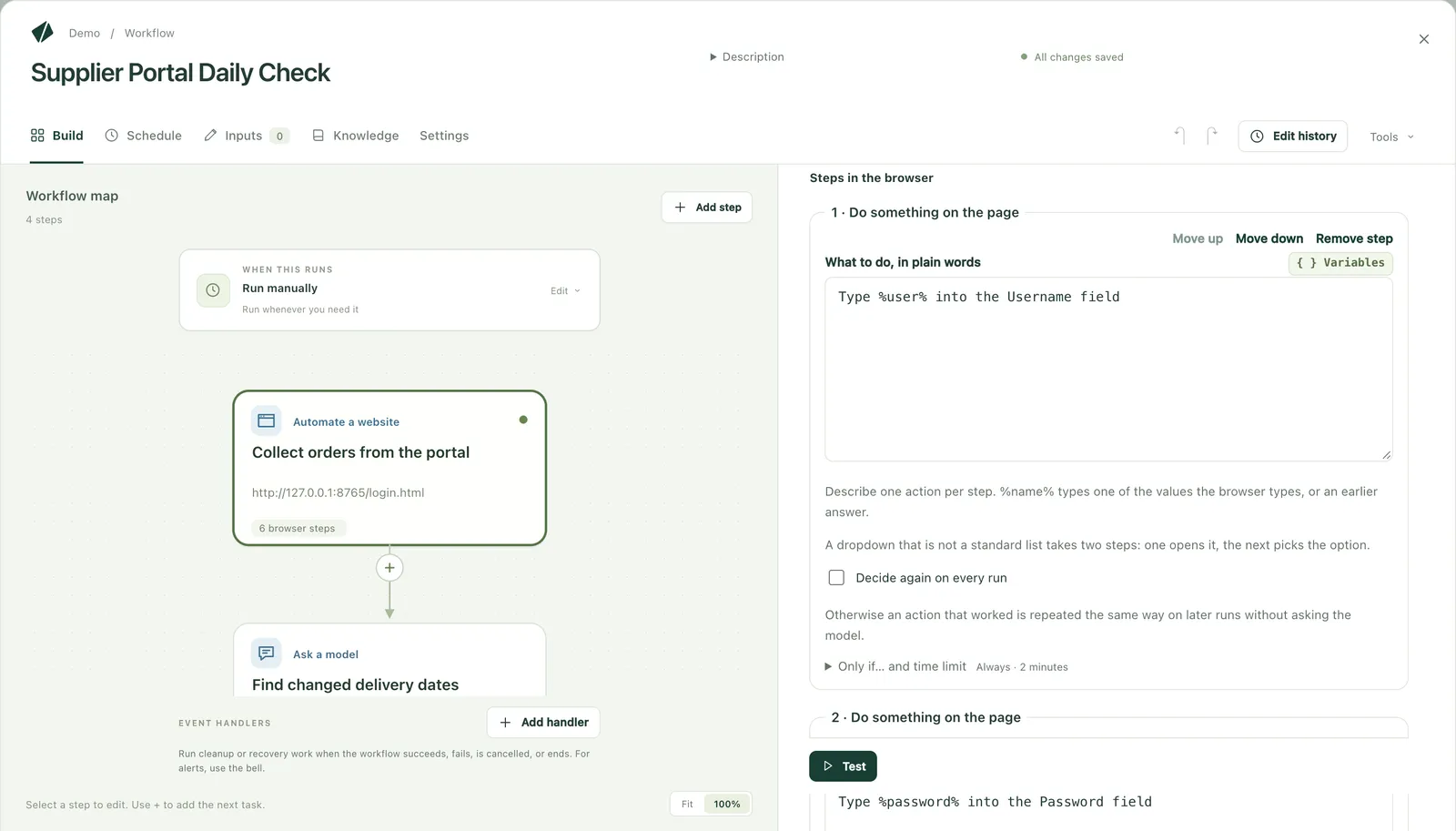
Write steps as sentences, fix them where they stop
You write workflows in the language of the work, not in a robot's settings. When a run stops, ask the assistant from the step that stopped.
How it differs from AI self-healing in RPA products
UiPath and Power Automate Desktop offer features that use AI to recover operations a screen change would otherwise stop. How they work, and on what terms, differs by product.
| Aspect | UiPath Healing Agent | Power Automate Desktop self-healing | Kitewell (AI RPA) |
|---|---|---|---|
| Status | Available | Preview | Available |
| How it recovers | AI recovers at run time. By default it only recommends fixes; an administrator enables automatic recovery | When an element cannot be found, AI looks for it again, at run time only | When the remembered steps do not work, AI reads the screen again and relearns the operation |
| On the next run | The recovery is not carried over. A developer applies the permanent fix in Studio | The flow is not fixed. A person fixes it later | The relearned operation is saved and repeated from then on |
| What it needs | The Enterprise plan includes 5,000 heals a year; Basic and Standard must buy them | An organizational Premium account; outside the US, a setting that moves data across regions | An AI model of your choice: a cloud API, or an in-house or local model |
Based on each vendor's published documentation as of October 2026. See the guides by product for details.
Keep, fix, or switch to AI RPA: deciding robot by robot
You do not have to switch every robot at once. Decide for each one, using the criteria below.
| The robot | Decision | Why |
|---|---|---|
| Repeats fixed operations at high volume and speed on an internal system whose screens rarely change | Keep it in RPA | RPA's speed pays off, and it rarely stops |
| The system it operates offers an API or CSV export | Replace it with the official integration | More resilient to change, faster, and more reliable than operating the screen |
| Stops for a known reason, and someone in-house can fix it | Fix it and keep it | Faster and cheaper than replacing it |
| Operates outside web systems whose screens change without notice | Switch it to AI RPA | No more waiting on the builder or a maintenance vendor for every fix |
| Needs judgment or a person's check, such as reading invoices | Switch it to AI RPA, pairing what AI reads with a person's approval | People decide, AI operates the screens |
| Its builder is gone, and nobody knows what it does | Investigate it and add it to the ledger first, then decide | Moving it blind leaves gaps in the work |
| Its work is gone, or nobody uses it | Retire it | Saves its license and the machine it runs on |
Compare total running costs, not license fees
License fees show only part of what RPA costs. Include the time spent fixing robots, the manual work while they are down, and the rework when browsers or scripting languages reach end of support.
| Cost | What tends to happen with traditional RPA | With Kitewell, an AI RPA |
|---|---|---|
| Licenses | Development and runtime licenses per PC or robot, exposed to price revisions | Team and Enterprise for organizations are quoted on the number of computers, never per user |
| Building | Built by staff who can use a dedicated development tool | Built by the people who do the work, by talking to the assistant, and applied after reviewing the diff |
| Fixing | Scenarios fixed after every screen change, often by the builder or an outside vendor | When the remembered steps do not work, AI reads the screen again and relearns the operation. Changes to the steps are made by talking |
| Manual work while down | Work piles up until someone notices, then is done by hand until the fix | The responsible people are notified, and the run continues from the step that stopped |
| Rework | Robots reworked together when a browser or scripting language reaches end of support | Steps are written in the language of the work, not the screen's structure, so small screen changes need no rewrite. A redesign that changes the flow of screens needs a review |
| Management and audit | Ledgers and procedure documents kept by hand, and soon out of date | Runs, changes, and approvals are recorded, and a robot ledger exports to Excel |
| AI usage fees | None (AI features need a separate license or contract) | None to repeat a remembered operation; fees only to learn one, relearn it, or read information from a screen or document |
What stays in your hands after you switch
What you switch to must not become another box only its builder understands. With Kitewell, these stay with you.
Readable steps
Workflows are kept as steps written in the language of the work, in YAML files people can read. Dagu, the workflow engine underneath, is open source, and anyone can review its code.
Knowledge
As it works, the assistant writes down in the knowledge what each workflow is for, why it was built that way, and how to fix it when it breaks. A new owner starts where the last one left off.
A robot ledger
Every workflow exports to Excel as a ledger that follows FISC's management items. Columns people decide, such as the owner, are left empty.
Run and change records
What ran and when, how each workflow changed, which step stopped, and which operations the AI relearned are all recorded.
How to switch to AI RPA
You do not have to switch everything at once. We recommend switching the work that breaks often and matters most first, and leaving work your current RPA handles well where it is.
1
Inventory
List the robots running today, how often each stopped, how long fixes took, and the impact of a stop. The result is the basis of a robot ledger.
2
Selection
Score robots by how often they stop, the impact of a stop, and the effort to fix them, and choose the top one to three. Replace work that has an API with the integration.
3
PoC
Build Kitewell workflows on the same screens and data as production, and measure them against success criteria.
4
Switch and settle in
Run old and new in parallel through a busy period, compare the results, then switch. Switch the rest in score order, and set up your team to fix it in-house.
Common mistakes
- Trying to replace everything at once, so the PoC never ends
- Copying scenarios operation by operation, old screen assumptions and all
- Starting without success criteria, so nobody can decide
- Skipping the parallel run, then stopping on an exception that appears only in a busy period
- Not planning backward from the license renewal date, and missing it
- Leaving it to the builders, without the business owners
Guides by product: from your RPA to AI RPA
For each RPA product, recent changes in pricing and support, and how to tell which work to keep and which to switch to AI RPA.
Articles on RPA's problems
Work that switches easily to AI RPA
Enter an Excel list into a web system
For each row of an Excel list of orders, AI enters it into a web system and writes the receipt number back into the row. Only failed rows are redone.
Enter records into a desktop accounting app
For each row of an Excel list, AI enters the record in a desktop app. A person approves before it is saved, and the slip number goes back into the row.
Collect orders and due dates from supplier portals
Every morning, collect new orders and delivery date changes from several customers' supplier portals and, after review, record them in the sales system.
Frequently asked questions
- What are the problems with RPA?
- Robots tend to stop when screens change, tend to become something only their builder can fix, multiply across departments until nobody can keep track of them, and are hard to trust with work that needs judgment. On top of license fees, fixing and maintaining them costs time and money.
- What is AI RPA?
- RPA in which AI reads the screen and works web and desktop apps the way a person does. Kitewell repeats operations the AI learned once, and uses AI again only when the remembered steps no longer work. You keep RPA's speed and repeatability, robots cope with screen changes, and you fix them by talking.
- Why does RPA stop so often?
- Most RPA finds what to operate by coordinates, images, or screen element details, assuming the screen as it was recorded. A redesigned screen or changed field, an unexpected pop-up, a slow page, unusual data, or a change in the browser or screen resolution leaves it unable to find its target, and it stops.
- What work is RPA best at?
- Repeating fixed operations at high volume and speed on internal systems whose screens rarely change. Robots like that are best left in your current RPA. Outside web systems whose screens change without notice, and work that needs judgment, suit AI RPA.
- What work is RPA not suited to?
- Operating outside web systems whose screens change without notice, work with many exceptions or judgment calls, work too infrequent to justify building a robot, and reading documents whose layouts vary. Where a system offers an API or CSV export, that is more reliable than operating its screens. Work that needs judgment or document reading can be automated with AI RPA, pairing what AI reads with a person's approval.
- Why does WinActor not work well for us?
- Usually not because of WinActor itself, but for reasons shared by any tool that operates screens as they were recorded: changed screens, unexpected pop-ups, slow pages, and changes in the environment. Price revisions from 2025 and the work needed for VBScript's deprecation are also prompting reviews.
- How does Kitewell differ from the AI self-healing in UiPath and Power Automate?
- UiPath's Healing Agent and Power Automate Desktop's self-healing (in preview) use AI to recover operations at run time. A recovery is not carried over to the next run, and a person makes the permanent fix. Outside the US, Power Automate also needs a setting that moves data across regions. Kitewell saves the operation it relearned and repeats it from then on, and the run record shows which operations were relearned.
- How do RPA and AI agents differ?
- RPA repeats fixed operations quickly, exactly as recorded. An AI agent reads the screen and reasons on every run, so it copes with changes but costs time and AI fees each run, and may not do the same thing every time. Kitewell repeats an operation the AI learned once, and uses AI again only when the screen changes.
- What is the "30-day wall" in Power Automate?
- A phrase used in Japan for the time limits on cloud flow runs. Microsoft's documentation says a run lasts at most 30 days, after which pending steps time out, and an approval can wait up to 28 days before the flow fails. It bites when an approver does not respond for a long time and the whole flow stops.
- What should a robot ledger contain?
- The robot's name, run cycle, the work it does, inputs and outputs, the owner and operator, the error handling policy, the systems it connects to, and related documents, among others. The robot management items listed by FISC (The Center for Financial Industry Information Systems) are a good reference. Descarty offers a free Excel template with 15 columns chosen from them.
- Can we switch if an outside company maintains our RPA?
- Yes. The vendor's design documents, change records, and history of stops are material for the inventory and the rewrite. After you switch, the business owners can fix workflows by talking with the assistant, so you need to call on outside help less for small fixes.
- Do the workflows we build stay with us?
- Yes. Workflows are stored on your side as steps written in the language of the work, in YAML files people can read. Dagu, the workflow engine underneath, is open source, and anyone can review its code.
- Which RPA tools are most widely used?
- Globally, UiPath, Automation Anywhere, and Blue Prism have long been called the big three. Among mid-sized and large companies in Japan, MM Research Institute's 2024 survey found Power Automate (24%), WinActor (21%), and UiPath (16%) most used. By revenue share, ITR ranks UiPath first for the eighth year running.
- How should we measure the effect of automation?
- Measure the same things before and after you switch: processing time per item and the owner's working time, the share of items processed, how many times it stopped and why, the time from a stop to resuming, items routed to a person, items processed wrongly, and AI fees. Descarty's PoC report covers items processed, time per item, AI usage cost, and how often and why runs stopped.
- Do we have to switch every robot?
- No. Robots that repeat fixed operations at high volume on internal systems whose screens rarely change are best left in your current RPA. Switch the robots that stop most and matter most to AI RPA first.
- How long does switching take, and what does it cost?
- For one robot that keeps stopping, a two-week, ¥300,000 (excluding tax) PoC shows whether Kitewell can replace it. If the agreed success criteria are not met, you pay nothing. A PoC covering several tasks typically takes four to six weeks in total.
- Does our business data leave the company?
- Kitewell runs on your PCs, your servers, your cloud, or a closed network. You can use a cloud AI API or an in-house or local model; with an in-house model, no data is sent outside, though small local models usually cannot operate a screen. Descarty never receives your business data.
Start by choosing what to switch
We look at your current robots and support you from choosing the work to switch to AI RPA through to a PoC.